



 Description
The aim of the chapter "CodeIgniter Adding JS and CSS" is to include and CSS/JavaScript features in any CodeIgniter built application.
Initially, JS and CSS files have to be included in the root folder of the project as shown below.
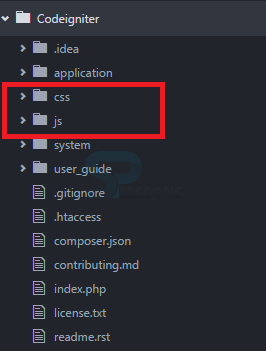 Then copy the required JS and CSS files in the corresponding folders. Just by adding the files in the folders doesn't complete the task. They have to be loaded into View which can be done with the help of
URL helper class present in the controller and Config.php file present in application/config folder.
[php]$this->load->helper('url');[/php]
Then add the below code in View file, to load the sample.js and style.css file in the view as shown below.
[html]
//To load css files
<link rel = "stylesheet" type = "text/css"
href = "<?php echo base_url(); ?>css/style.css">
//To load js files
<script type = 'text/javascript' src = "<?php echo base_url();
?>js/sample.js"></script>
[/html] Example
Step-1 : Create the controller 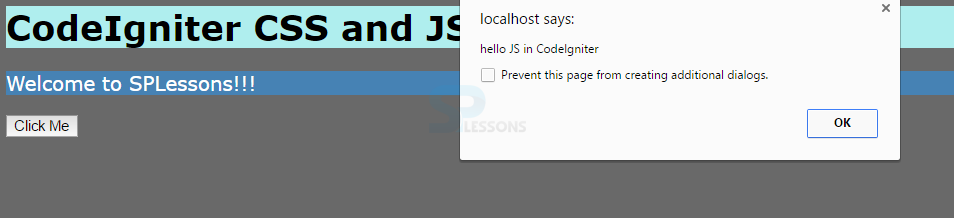
example.php in the file path application/controllers and enter the below code.
[php]
<?php
defined('BASEPATH') OR exit('No direct script access allowed');
class Example extends CI_Controller {
public function index()
{
$data['css'] = $this->config->item('css');
$data['js'] = $this->config->item('js');
$this->load->helper('url');
$this->load->view('example_view',$data);
}
}
[/php]
Step-2 : Create a view example_view.php in the file path application/views and enter the below code.
[html]
<html>
<head>
<title>Hello Sample Css</title>
<link rel="stylesheet" type="text/css" href="<?php echo base_url(); ?>css/mycss.css">
<script type='text/javascript' src="<?php echo base_url(); ?>js/myjs.js"></script>
</head>
<body>
<h1>CodeIgniter CSS and JS Example</h1>
<p>
Welcome to SPLessons!!!
</p>
<input type="button" onclick="return showalert();" value="Click Me"/>
</body>
</html>
[/html]
Step-3 : Create the JavaScript file myjs.js.
[javascript]
function showalert()
{
alert('hello JS in CodeIgniter');
}
[/javascript]
Step-4 : Create the CSS file mycss.js.
[css]
body
{
background-color:#696969;
color:red;
}
h1
{
font-family:verdana;
background-color:#AFEEEE;
color:black;
}
p
{
font-family:verdana;
background-color: #4682B4;
color:white;
font-size:18px;
}
[/css]
Step-5 : Configure the above CSS and JS files in application/config/config.php file using the following code.
[php]
$config['css'] = 'mycss.css';
$config['js'] = 'myjs.js';
[/php]
Output:
Key Points
"CodeIgniter Adding JS and CSS" draws out following important points.
- URL helper class present in the controller will load the CSS and JS files in CodeIgniter.
- CSS and JS folders are created in the root of application.